Streamlining Professional Presentations with the Conference PowerPoint Template
Creating a compelling presentation is a critical part of business communication, whether you're pitching to investors, reporting to stakeholders, or sharing insights at a conference. The Conference PowerPoint Template offers a streamlined solution for professionals who need to produce high-quality slides without spending excessive time on design details. This template is not just a visual aid—it's a practical tool that integrates into broader planning and execution workflows, enhancing clarity, consistency, and efficiency.
What Is the Conference PowerPoint Template?
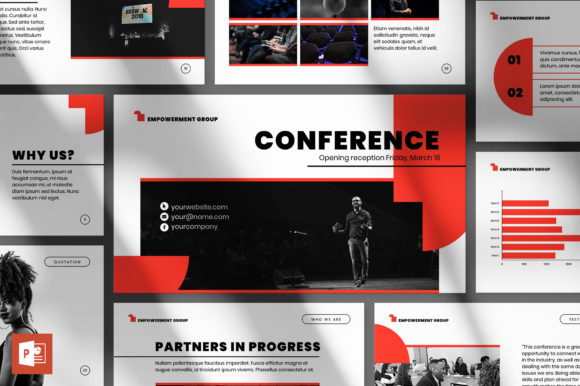
The Conference PowerPoint Template is a fully customizable presentation layout designed for business professionals, educators, and creatives who need to deliver visually engaging content. It includes 50 unique slides, each built with a modern aesthetic and flexible structure. Compatible with Microsoft PowerPoint, it supports Full HD resolution (1920x1080px) and comes with color themes that can be changed in a single click. The template includes ready-to-use slide designs, animated transitions, and well-organized layers that make customization intuitive.
How It Fits Into the Presentation Workflow
In a typical presentation workflow, time is often spent adjusting layouts, formatting text, and sourcing visuals. The Conference PowerPoint Template eliminates much of this manual work by offering a pre-designed structure that users can easily adapt. Whether you're preparing a quarterly business review, a marketing strategy pitch, or an internal team update, this template provides a starting point that aligns with professional expectations.
Before a presentation, users can import their content directly into the placeholders, add company branding, and adjust color schemes to match existing materials. During delivery, the clean design and animated elements help maintain audience engagement. After the presentation, the same template can be reused or adapted for follow-up reports or client proposals, ensuring consistency across communication materials.
Use Cases Across Different Industries
- Startups: Founders preparing investor pitches can use the template to create visually cohesive decks that highlight business models, growth metrics, and market opportunities.
- Marketing Teams: Campaign summaries, audience insights, and performance reports benefit from the template’s infographic-style visuals and clean data layouts.
- Educators: Teachers and trainers can build engaging lesson plans or conference talks with slide structures that support both text and multimedia content.
- Freelancers: Designers, consultants, and copywriters can showcase portfolios or project proposals using a polished, branded format that reflects their professionalism.
Integration with Other Tools and Platforms
The Conference PowerPoint Template works seamlessly with common productivity tools and design platforms. Since it's built for Microsoft PowerPoint, it integrates naturally with the broader Microsoft Office suite, including Excel for data charts and Word for content drafting. Users can export slides as PDFs or images for sharing via email or embedding in reports. For those who collaborate in cloud-based environments, the template is compatible with online PowerPoint versions, allowing for real-time editing and feedback.
Additionally, because the slides are fully editable, they can be imported into other presentation tools like Google Slides or exported for use in video presentations or webinars. This flexibility makes it a valuable asset for teams that use multiple platforms or need to repurpose content across different formats.
Practical Implementation Tips
To get the most out of the Conference PowerPoint Template, consider the following best practices:
- Start with a Content Outline: Before diving into design, map out your key messages and supporting points. This helps ensure that each slide serves a clear purpose.
- Customize Branding Elements: Adjust the color themes and fonts to match your brand identity. The one-click color change feature makes this process quick and consistent.
- Use High-Quality Images: The template includes image placeholders—fill them with professional photos or graphics that reinforce your message.
- Leverage Animations Strategically: While the template includes animated slides, use transitions and effects sparingly to maintain professionalism and avoid distraction.
- Save Custom Versions: Once you’ve customized the template for a specific use, save it as a new file to preserve the original for future projects.
Preparing for Smooth Delivery
One of the key benefits of using the Conference PowerPoint Template is that it allows presenters to focus more on content and delivery rather than formatting. With a clean, professional layout already in place, you can dedicate time to refining your message, practicing delivery, and anticipating questions. The template’s compatibility with PowerPoint’s built-in presentation tools—like speaker notes and rehearsal timings—further supports this preparation phase.
For team presentations, the well-organized structure of the template ensures that multiple contributors can work on different slides without conflicting design inconsistencies. This makes it ideal for collaborative environments where multiple departments or team members contribute to a single presentation.
Long-Term Use and Scalability
As your business or project evolves, the need for updated and consistent visual materials grows. The Conference PowerPoint Template is designed with long-term usability in mind. Its flexible layout and modular design allow for easy updates, whether you're refreshing branding, adding new data, or adapting content for different audiences.
Because the template includes a help file and offers friendly support, users can quickly resolve any technical questions that arise during customization. Additionally, free updates ensure that the template remains compatible with newer versions of PowerPoint and continues to reflect current design trends.
Enhancing Efficiency and Consistency
Consistency is crucial in professional communication. The Conference PowerPoint Template helps maintain visual and structural consistency across presentations, which is especially important for businesses that produce frequent reports, marketing materials, or client-facing content. By using a standardized template, teams can ensure that every presentation aligns with brand guidelines and conveys information in a coherent manner.
This consistency also benefits internal processes. When all team members use the same template, it reduces the time spent on formatting and allows for smoother handoffs between presenters or departments. It also makes it easier to archive and reference past presentations, as the layout and structure remain familiar.
Conclusion
The Conference PowerPoint Template is more than just a design tool—it's a strategic asset that supports efficient, professional communication. By reducing the time and effort required to create polished presentations, it allows users to focus on content, messaging, and delivery. Whether you're preparing for a client meeting, a product launch, or an internal strategy session, this template provides a flexible, scalable solution that integrates seamlessly into your workflow.